Refining Results
Refinement lets you make targeted edits to a generated render - change specific areas, adjust the overall look, or fix imperfections.
Note: Refinement is available for Premium tier results only.
Getting Started
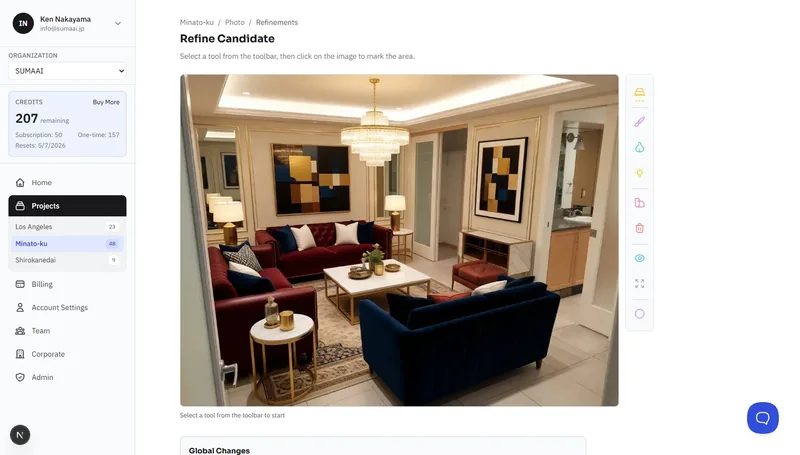
- On the results page, click Refine on any Premium result.
- The refinement editor opens with your result loaded.
Regional Edits
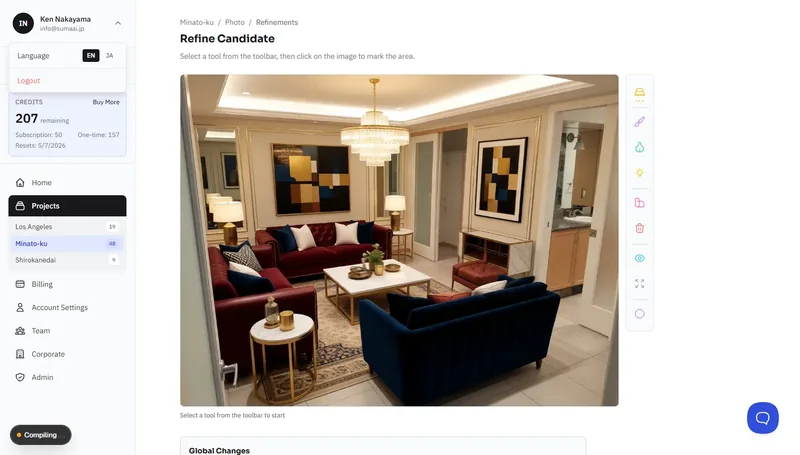
Paint directly on the image to mark areas you want to change.
How to Mark a Region
- Select a tool from the toolbar.
- Click and drag to paint the area you want to edit.
- Use the Eraser to remove parts of your selection.
- Click Done when you've marked the region.
Each region is numbered and can be assigned a different edit action.
Limits:
- There's a minimum region size - very small areas may be rejected.
- You can place multiple regions per iteration (up to the maximum shown).
- Regions cannot overlap.
Available Regional Edits
Windows & Openings
- Change Window Style - Modern, Traditional, Arched, Industrial
- More Windows - add additional windows
- Fewer Windows - reduce the number of windows
Materials & Surface
- Change Material - Brick, Stone, Concrete, Wood, Stucco, Glass, Metal
- Change Color - Lighter, Darker, Warmer, Cooler
Architectural Elements
- Add Balcony
- Add Canopy/Awning
- Change Roof - Flat, Gable, Hip
- Improve Entrance
Cleanup
- Remove Artifacts - fix AI glitches or unwanted elements
- Sharpen Details - enhance clarity in a specific area
- Fix Proportions - correct scale or perspective issues
Furniture (for staged interiors)
- Add Sofa/Seating
- Add Table/Desk
- Add Bed
- Add Chair
- Add Storage
- Change Style - Minimalist, Scandinavian, Mid-Century, Japandi
- Add Decor - Plants, Wall Art, Rug, Cushions/Throws
- Add Lighting - Floor Lamp, Table Lamp, Pendant Light, Wall Sconce
- Remove Items - list specific items to remove
Global Changes
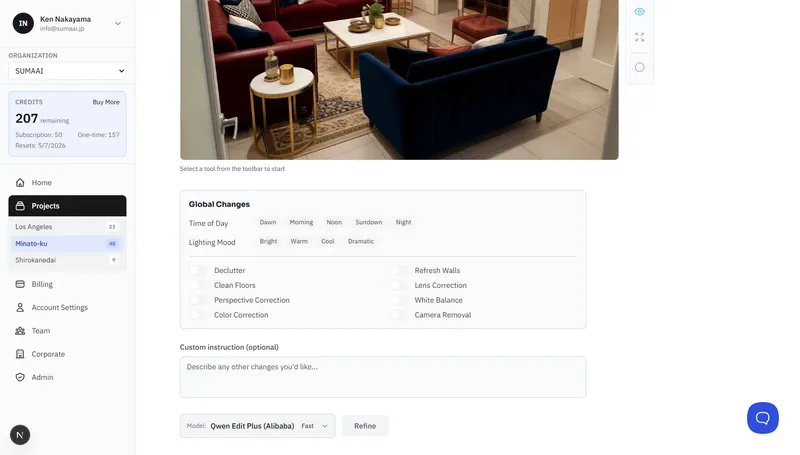
These apply to the entire image without needing to mark a region.
Exterior Globals
| Category | Options |
|---|---|
| Time of Day | Dawn, Morning, Noon, Afternoon, Sunset, Blue Hour, Night |
| Sky & Weather | Clear Blue, Partly Cloudy, Overcast, Dramatic |
| Season | Spring, Summer, Autumn, Winter |
| Landscaping | Improve landscaping |
| Street | Clean street |
| Fencing | Add or improve fence |
Interior Globals
| Category | Options |
|---|---|
| Lighting Mood | Bright, Warm, Cool, Dramatic |
| Declutter | Remove clutter and tidy up |
| Refresh Walls | Clean up wall surfaces |
| Clean Floors | Improve floor appearance |
Photo Corrections
| Category | Description |
|---|---|
| Color Correction | Adjust overall color balance |
| Perspective Correction | Fix converging verticals |
| White Balance | Correct color temperature |
| Lens Correction | Fix barrel/pincushion distortion |
| Camera Removal | Remove visible camera or tripod reflections |
Custom Instructions
Use the free-text field at the bottom to describe any other changes:
- "Make the front door red"
- "Add a Japanese maple tree on the left"
- "Replace the carpet with hardwood floors"
Choosing an AI Model
You can select which AI model processes your refinement:
| Model | Best For |
|---|---|
| Gemini 2.5 Flash | Fast, reliable results |
| Gemini 3 Pro | Highest quality |
| Nano Banana 2 | Pro quality at flash speed |
| GPT Image 1.5 | High-fidelity editing |
| FLUX Kontext Pro | Fast editing |
| FLUX Kontext Max | Best FLUX quality |
Additional models are available - select the one that fits your needs.
Submitting a Refinement
- Mark your regions and/or select global changes.
- Optionally add custom instructions.
- Click Refine.
- Wait for the result to generate.
- You'll see the refined version alongside the original on the results page.
Iterating
Refinement is iterative - you can refine a refined result. Click Refine Again on any refinement output to make further adjustments. Each iteration builds on the previous one, letting you progressively perfect the result.
Reviewing the Refinement
After a refinement completes, you're redirected back to the results page where the refined version appears alongside the original. If the result isn't what you wanted, click Discard to remove it.