
Virtual staging has changed a lot in a short period of time. Not long ago, virtual staging usually meant emailing photos to a designer and waiting a couple of days for the finished result. Today, many AI tools can generate a staged image from a room photo in less than a minute. AI has made that speed possible, and the quality of the best tools has caught up to the point where the output is difficult to distinguish from physical staging.
But the market has also become more crowded.
There are now more virtual staging tools than most agents or photographers will ever evaluate, and the marketing for all of them sounds similar.
Every tool claims to be fast, affordable, and realistic. Our guide covers the main types of virtual staging tools, what to actually look for when comparing them, and a detailed breakdown of some of the major tools on the market. We’ll review dedicated AI tools alongside general AI image generators.
Our goal is to give you what you need to choose the right tool for your listing workflow.
Before we get to that, here’s a first look at the tools we’ll review. Naturally, starting with our own platform.
First Look: At-a-Glance Comparison
Platform | Best For |
|---|---|
Virtual Staging Art | Agents, photographers, property managers |
Collov AI | Teams and brokerages needing volume |
Apply Design | Users who want manual control over staging |
VirtualStaging.ai | Subscription-based volume staging |
Styldod | Human-edited staging with Matterport support |
REimagineHome | Design exploration, renovation concepts, shoppable staging |
Trolto | Agents building a social media content pipeline |
RoOomy | Luxury listings and Matterport 3D tour staging |
Nano Banana / GPT-image / Gen-AI image models | Experiments, prototypes, and teams building their own staging workflow |
The Main Types of Virtual Staging Software
Before comparing individual tools, it helps to understand the three categories they fall into.
AI virtual staging software generates furnished room images automatically. You upload a photo, choose a room type and style, and the tool produces a staged version in seconds or minutes. This is the fastest and most flexible option for most listing workflows. Quality varies significantly between tools and between underlying models, but the best AI staging today is genuinely competitive with human-edited alternatives for standard listings.
Designer-led virtual staging services use human editors to stage your photos. You submit images and a brief, and a designer produces the finished result. This is slower and more expensive than AI staging, but it can be a good fit when you need custom interpretation, very specific furniture plans, or staging for 3D Matterport tours. The turnaround is typically 24 hours to several days.
DIY and raw gen-AI tools put more of the work in your own hands. Image models like Nano Banana or GPT-image can be prompted to transform room photos. These can be useful for experimentation, but they are generally not the right choice for listing-ready photos on their own, and we’ll have more on that in the individual sections below.
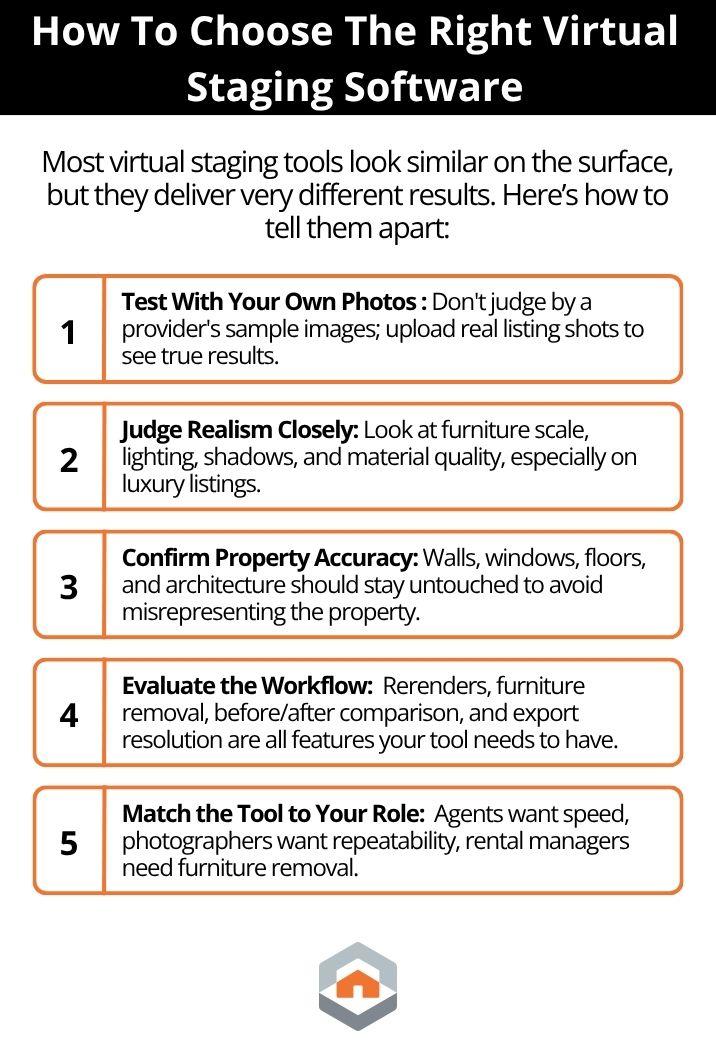
How To Choose a Product That's Right For You
Most agents and photographers make their decision based on price and sample images.
That is not the best approach.
Sample images on a provider's own website are selected to show the tool at its best. The more useful test is uploading your own photos, the kind you actually shoot, and then evaluating what you get back.
Start With the Output
For listing use, three things matter most.
1. Does the Image Actually Improve the Listing?
Some platforms technically add furniture to a room without making the space feel more marketable. The layouts feel repetitive, the furniture lacks personality, and every room starts to look the same.
Good staging should help buyers emotionally understand the space. It should make the room feel intentional, livable, and aligned with the likely buyer profile for the property.
2. Does It Look Believable?
Realism is where the quality gap between platforms becomes obvious.
The furniture scale should match the room. Lighting should feel natural. Shadows should make sense. Materials should hold up when viewed full screen, especially in luxury listings, where low-quality rendering is much easier to spot.
Style variation also matters more than most providers admit. "Modern," "Japandi," and "Coastal" should not look like the same layout with slightly different decor.
3. Does It Preserve the Property Accurately?
Virtual staging should furnish the room, not redesign it.
Windows, floors, walls, ceiling lines, built-ins, and architectural details should remain consistent with the original image. If those elements change, the image stops being staged and starts becoming a misleading representation of the property.
That creates potential disclosure issues, MLS compliance concerns, and unnecessary risk.
Then Assess the Workflow
Once you have confirmed the output quality meets your standard, evaluate the workflow:
- Can you rerender without starting over if you do not like the first result?
- Can you compare before and after easily?
- Is furniture removal included if you need to clear an occupied room first?
- Does the pricing model charge for every render, or for final images?
- Is high-resolution export included, or is it an add-on?
- Does the tool support watermarks or disclosure text where your MLS or brokerage requires it?
A tool that looks cheap per render may be more expensive in practice if it takes five attempts to get one publishable image, and that's before factoring in how AI virtual staging compares to traditional staging costs overall. If you want a more complete breakdown of what staging typically runs, our home staging pricing calculator covers the numbers in detail.
Understand what model quality actually means
Most AI virtual staging tools use some version of image generation to produce their output. The models differ in capability, and those differences show up clearly in the results.
Older or lower-cost models tend to repeat the same furniture patterns, produce similar layouts across different room types, and struggle with challenging photos. They’ll deliver images with unusual angles, low light, and cluttered spaces. They can produce acceptable results for simple vacant rooms but often fail on anything more complex.
More capable models, for example, gemini-3.1-flash-image, improve on the things that are harder to automate: material realism, appropriate furniture scale, convincing variation between style directions, and how the staging holds up under the specific lighting conditions of your photo.
The gap between a generic AI result and a result from a strong model becomes most visible in hero rooms, luxury listings, and any property where the staging needs to feel unique and tailored to specific specifications.
Ensure Your Software Matches Your Workflow
The right staging solution depends entirely on your role and your timeline.
Real Estate Agents: AI staging is almost always your best starting point. Look for platforms that offer quick turnarounds, reliable room accuracy, and enough style options to match your buyer profile.
Real Estate Photographers: Repeatability matters just as much as aesthetics. Prioritize tools that offer robust before-and-after review interfaces, high-resolution exports, and reliable revision control.
Rental & STR Managers: Since you frequently deal with occupied rooms, prioritize tools with powerful, clean furniture-removal workflows so you can clear existing belongings quickly.
Luxury Marketers: Quality must drive the decision. Do not let per-image costs dictate your tool choice when the staging will be scrutinized by high-value buyers.
With that in mind, here are the best virtual staging platforms available right now, starting with our own platform.
Best Virtual Staging Software
Virtual Staging Art
Virtual Staging Art is an AI virtual staging platform built specifically for real estate listing workflows. It is designed to help agents, photographers, property managers, and real estate teams turn room photos into listing-ready staged images without writing prompts themselves.
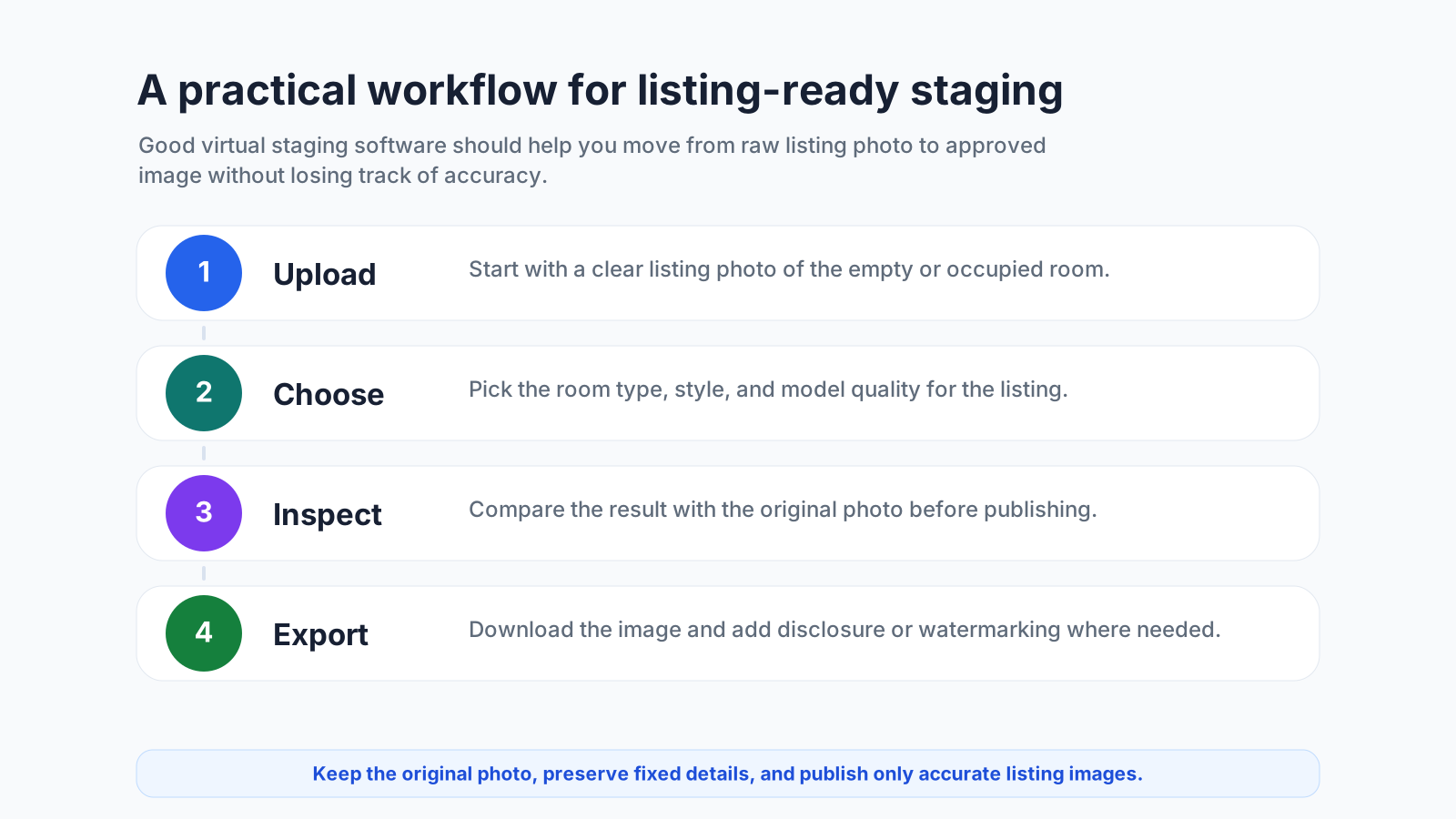
Upload a room photo, choose a room type and style, review the result against the original image, and rerender when needed. The product emphasis is on a guided workflow: staging, before-and-after review, export, and responsible listing use in one place.
For users, the important difference is less about the technical choices behind the scenes and more about whether the tool saves time, keeps the room believable, and helps avoid misleading edits.
Beyond staging, the platform also supports adjacent listing-image workflows such as furniture removal, cleanup, and photo editing, so teams do not have to move every image through separate tools.
Before-and-after review is important because agents need to compare the staged image with the original room before publishing.
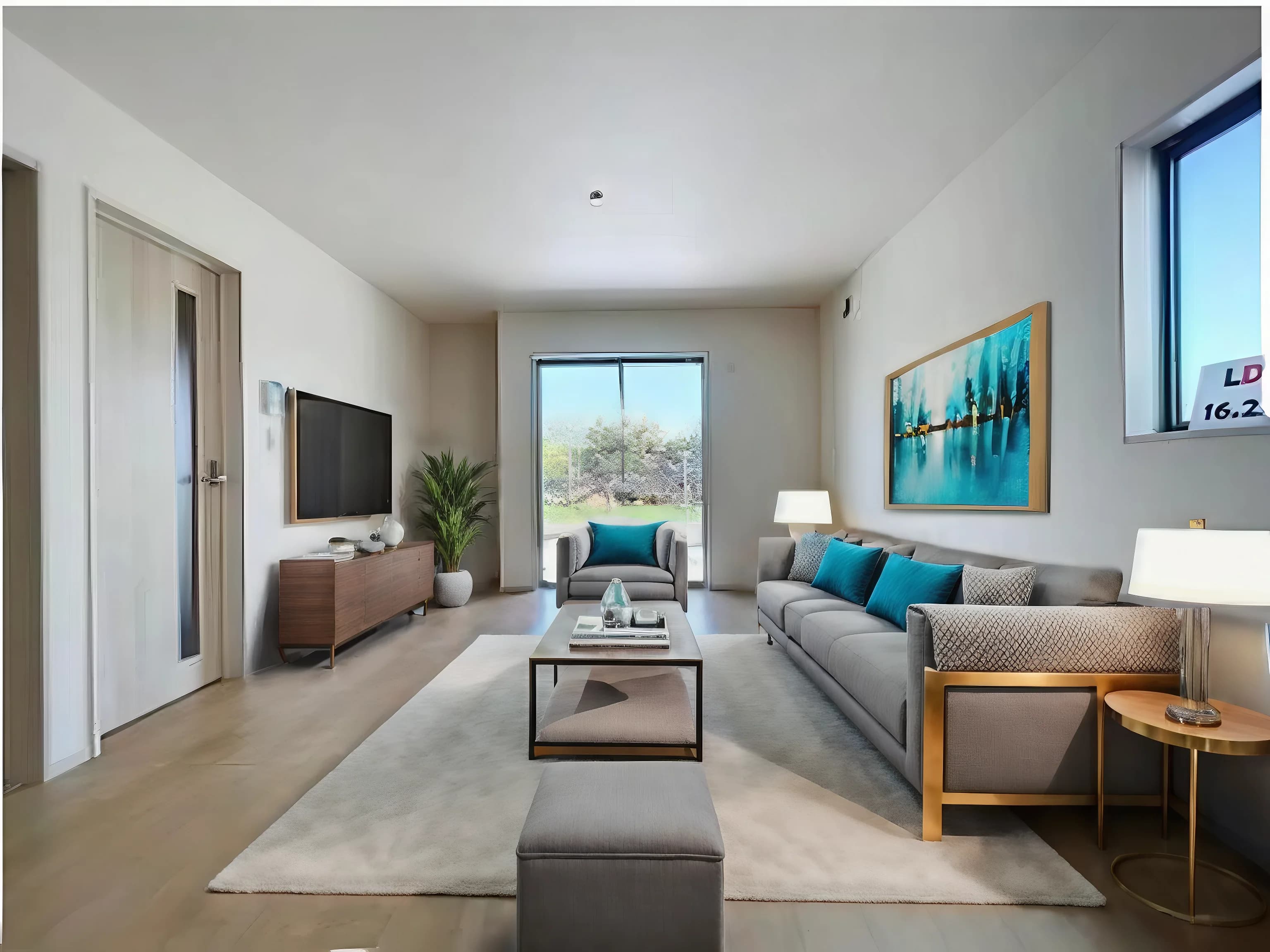
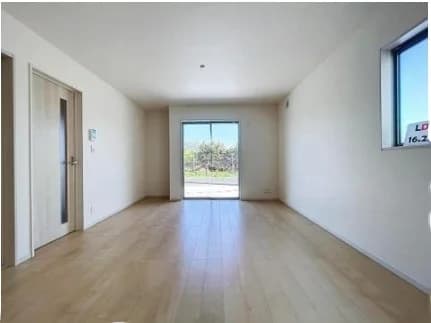
Drag to compare an original room photo with a virtually staged result.
Pros | Cons |
|---|---|
Purpose-built for real estate staging rather than raw prompting | No permanent free tier |
Combines staging with adjacent listing-image cleanup and editing workflows | High-volume teams should check monthly credit needs before choosing a plan |
Guided workflow helps reduce prompt-writing and review time | Not a replacement for designer-led custom interior design |
Pricing is subscription-based, with monthly plans listed as follows:
- Starter: $29/month: 40 photo credits
- Professional: $79/month: 120 photo credits
- Agency: $165/month: 300 photo credits
- Corporate: $299/month: 600 photo credits
- 1 photo credit = 1 staged image, furniture removal, photo edit, or refinement
- House rendering = 2 photo credits
Best for: Agents, photographers, and property managers who want fast AI staging and a guided listing-image workflow without switching between tools.
Collov AI
Collov AI is an AI virtual staging and photo editing platform with a broad feature set. Like Virtual Staging Art, it’s built for agents, teams, and brokerages that need more than just empty-room staging.
The core staging tool supports all major room types and styles, including Scandinavian, Modern, Industrial, and Luxury, across all plans.
Beyond staging, the platform covers furniture removal and room declutter, material overlay for walls, floors, cabinets, and countertops, environmental edits including twilight conversion, weather changes, season changes, pool water enhancement, and lawn replacement.
Advanced plans and above add AI Chat Edit, which lets you refine results conversationally without starting over. Premium adds AI Virtual Tour generation from still images, 360 panorama, AI 3D Tour, and Human-Assisted Multi-Angle Staging. API access is available on Enterprise.
Pros | Cons |
|---|---|
Exceptionally broad feature set beyond core staging | AI Chat Edit and photo editing tools not included on the entry Standard plan |
Competitive per-credit pricing with a clear plan structure | Virtual tours, 360 panorama, and multi-angle staging require Premium or above |
One-click virtual staging disclaimer built into all plans | No permanent free tier and trial images are watermarked |
Conversational editing via AI Chat Edit on Advanced and above |
Monthly billing starts at $27/month and provides 60 photo credits.
Best for: Teams and brokerages that need high-volume AI staging with broad photo editing, environmental enhancements, and virtual tour tools in one platform.
Apply Design
Apply Design gives users a choice between one-click AI auto-staging and a fully manual drag-and-drop editor, making it the most hands-on option among the AI-first tools on this list.
The platform runs entirely in the browser with no software to install. The AI Auto Staging mode produces a staged image in around 10 minutes from a single click, handling furniture placement and style automatically. The DIY mode opens a 3D editor where you can choose from a catalog of over 18,000 furniture and decor pieces, drag and place items precisely, and adjust size, orientation, and layout yourself. Both modes support 2D and 360 images, AI-driven furniture removal, multi-angle consistency across a property shoot, and unlimited revisions.
Pros | Cons |
|---|---|
Two staging modes provide different levels of control | AI auto staging takes 10–15 minutes, slower than most AI-first competitors |
First image free in both modes | Per-image coin pricing adds up at volume with no subscription option |
360 virtual staging is supported on both modes | The Apply Coins credit system can feel confusing at first |
Apply Design uses a credit system called Apply Coins. Coins are purchased in bundles. Generally the more you buy, the lower the per-coin price. Pricing starts at $10 for 9 Apply Coins.
Best for: Agents, photographers, and stagers who want direct control over furniture placement and are comfortable spending more time in the editor to get a specific result.
VirtualStaging.ai
Before we get into product details, we’ll add that VirtualStaging.ai is a separate company and product to Virtual Staging Art. Both names appear frequently in the same searches and are easy to mix up.
Within the platform, you can upload a photo, select a room type and one of 30+ design styles, and receive a staged image in seconds. If a style does not exist in the platform, you can upload a reference photo and the AI will generate a custom style from it.
Item removal is included at no extra cost on all plans. Unlimited regenerations are available on every tier, and all credits roll over month to month as long as the subscription is active. As virtualstaging.ai is a company of virtualstaging.com, each subscription also includes two free human designer staging credits per month at VirtualStaging.com.
Pros | Cons |
|---|---|
Credits roll over month to month | Multi-angle staging is currently in early beta only |
Unlimited regenerations on all plans at no extra cost | No element-level edits, only full regeneration if unsatisfied |
Two free human designer credits per month are included with every plan |
Plans start at approximately $25/month for 20 photo credits, scaling to around $39/month for 40 credits and $85/month for 100 credits, with higher-volume tiers available.
Best for: Agents who want subscription-based AI staging with rolling credits, unlimited revisions, and the option to escalate to human designers when AI output falls short.
Styldod
Styldod is a designer-led virtual staging service where human editors handle every image, making it the right choice when you want to hand off the staging judgment entirely rather than manage an AI tool yourself.
You upload your listing photos, select a design style, and add any notes on room type or specific requirements. A designer stages the images and returns them within 24 to 48 hours, with unlimited free revisions included. A free trial is available with no credit card, one staging image, one object removal, and two image enhancements included. Styldod also publishes REimagineHome, its separate AI staging product, covered in the next section.
Pros | Cons |
|---|---|
Human-edited output with designer attention to layout, accessories, and detail | 24 to 48 hour turnaround is not suitable when you need images within the hour |
Unlimited free revisions on every order | More expensive per image than AI-first tools |
Commercial and Matterport 3D tour staging supported | No instant AI option |
Styldod charges between $16 and $23 per image for its virtual staging services.
Best for: Agents who prefer to fully outsource staging to a human designer, need commercial or Matterport staging, or are handling listings where designer judgment and revisions matter more than speed.
REimagineHome
REimagineHome is an AI design platform built by Styldod that covers a broad range of use cases well beyond core virtual staging, which is both its strength and the reason it may not be the right fit for agents who just need fast, listing-ready results.
The platform's toolset includes virtual staging, furniture removal, furnished room redesign, landscaping, hardscaping, object removal, sky replacement, day-to-dusk, lawn replacement, interior renovation, exterior rendering, surface restyling, image enhancement, and more. The tradeoff is that REimagineHome is a broad design tool first and a real estate staging tool second.
The conversational workflow adds flexibility but also complexity. Agents who want to upload, click, and download will find purpose-built staging tools faster and simpler.
Pros | Cons |
|---|---|
Very broad feature set covering staging, editing, renovation, and exterior | Not purpose-built for real estate listing workflows |
5 free designs with no credit card required | The Essential plan is significantly limited compared to Pro plan |
More complex to learn than simpler AI staging tools |
As with other tools, pricing options vary. REimagineHome’s Essential package, which includes basic staging and light edits using legacy tools, starts at $14/month for 30 credits.
Best for: Agents exploring design concepts, renovation planning, or seller visualization conversations
Trolto
Trolto is not a traditional virtual staging tool in the same sense as Virtual Staging Art, Collov AI, or VirtualStaging.ai. It is better understood as a real estate marketing platform that turns listing assets into social content, cinematic property videos, single-property websites, listing presentations, and other agent-facing marketing materials.
That makes it relevant to this list because many agents do not only need a staged image. They need listing visuals packaged into the formats that actually get distributed: Reels, social posts, property pages, and seller-facing materials. If your main bottleneck is turning listing photos into repeatable marketing content, Trolto belongs in the comparison.
The tradeoff is focus. Trolto is not the strongest fit if you are specifically looking for a virtual staging engine with room-type controls, style generation, furniture removal, before-and-after QA, disclosure support, and staging-specific export workflows. It sits downstream from staging: useful once you have listing images, less useful if your primary need is creating the staged images themselves.
Pros | Cons |
|---|---|
Strong fit for agents who need listing videos and social content from property assets | Not purpose-built as a virtual staging renderer |
Useful for packaging listing visuals into repeatable marketing formats | Less relevant if you only need staged still images |
Can support an agent content pipeline beyond a single listing photo | Staging-specific controls, QA, and disclosure workflows are not the core value proposition |
Pricing is not presented like a per-image virtual staging product. Check Trolto’s current plans directly if your comparison is based on monthly social content volume rather than staged-photo output.
Best for: Agents who already have listing photos or staged images and need a faster way to turn them into branded listing videos, social posts, and property marketing assets.
RoOomy
RoOomy is another designer-led virtual staging service. Every project is handled by an interior designer rather than an AI model.
You place an order, select a design style, and the team delivers staged images within 24 hours on workdays. However, unlike AI-native tools, extensive furniture removal is a separate service. If the rework option is selected, unlimited design revisions are available within the same style and room function. The platform also accepts custom design inspiration decks and reference photos for briefs that fall outside the standard style options.
On the Matterport side, RoOomy stages entire 3D tours by selecting and furnishing the scan points that create a smooth flythrough, then transfers the completed tour back to your Matterport account. A virtual renovation service is available for both photo-based and Matterport projects.
Pros | Cons |
|---|---|
Bespoke human-designed output with genuine designer judgment on every project | Significantly more expensive than AI staging tools per image |
Unlimited reworks included on the rework tier | No AI option, turnaround depends on designer availability |
Accepts custom design briefs and reference photos | Matterport pricing is substantial, especially for smaller properties |
Pricing varies, with virtual staging without rework beginning at $49 and Matterport virtual staging pricing starting at $434.
Gen-AI Image Models: Nano Banana, GPT-image, and Similar Tools
Image models such as Nano Banana, GPT-image, and similar frontier generation tools come up regularly in virtual staging conversations. They are worth understanding because they can produce impressive interiors. In the right hands, they can stage a room, restyle a space, remove furniture, or generate design concepts from a listing photo.
But the model is only one part of a usable real estate workflow.
This is the part we know well from building Virtual Staging Art. A good staging result is not just "a pretty furnished room." The software has to understand what kind of room it is, what the buyer should notice, where the walking paths are, how furniture should sit in the room, and which parts of the property need to stay exactly as photographed. Regular image models can struggle with that context, especially in rooms with awkward circulation, open-plan layouts, unusual camera angles, partial walls, tight bedrooms, or spaces where furniture placement needs to imply how someone would actually move through the room.
Scale is another common failure mode. General image models often create furniture and decor that look plausible at first glance but do not quite fit the room’s proportions. Sofas, beds, rugs, tables, and art can come out subtly too small, sometimes dramatically so, which makes the room feel staged as an image rather than designed as a real space.
If you use an image model directly, that work falls on you. You may need to write a detailed prompt, explain the room function, specify the staging style, call out circulation constraints, check whether the layout makes sense, compare the output to the original photo, and rerun the image when the model misunderstands the space or gets the furniture scale wrong. A single good output can look magical. Getting consistent, listing-ready results across a full property can take much longer than expected.
These models are still useful. They are great for experiments, staging concepts, seller conversations, and teams with the time to build their own review process. They are not usually the best choice for agents or photographers who simply need consistent, listing-ready staged photos without spending time on prompt writing, repeated attempts, layout review, and manual quality control.
Pros | Cons |
|---|---|
Powerful image-generation quality for experimentation and concepts | Can take significant time to prompt, inspect, rerun, and compare against the original room |
Flexible enough for unusual design directions and seller conversations | Often struggles with tricky room interpretation, circulation, scale, and believable furniture proportions |
Useful for teams willing to build their own review workflow | Not ideal for agents or photographers who need repeatable listing-ready output quickly |
Pricing depends on how you access the model: consumer AI subscriptions, bundled usage limits, or API usage. For real estate, the more important cost is usually the time and failed attempts required to get one image you would confidently publish.
Best for: Experiments, staging concepts, seller conversations, and teams willing to spend time reviewing and rerunning outputs. Most listing teams will be better served by purpose-built staging software that wraps strong models in a real estate workflow.
Pricing: Compare the Final Usable Image
Virtual staging pricing can be confusing because different tools price different things.
Some tools charge for every generated render. Some charge per final staged image. Some use subscription credits. Designer-led services usually charge per finished image. Social-content tools may charge monthly for output volume rather than by staged room.
For a fair comparison, use the vendor’s monthly pricing and ask what you actually get for that month:
- How many listing-ready staged images can you publish?
- Are rerenders or revisions included?
- Is furniture removal included?
- Is watermark-free export included?
- Is high-resolution export included?
- Does the tool charge per render, per final image, per credit, or per marketing asset?
Here is the practical way to read the pricing in this article:
Platform | Pricing model to compare | What to watch |
|---|---|---|
Virtual Staging Art | Monthly subscription credits | Compare credits against the number of rooms, edits, refinements, and house renders you expect each month |
Collov AI | Monthly subscription credits | Monthly billing starts at $27/month for 60 photo credits; higher tiers add more tools and volume |
Apply Design | Purchased Apply Coins | Good for manual control, but compare the coin cost of the final staged image you would actually publish |
VirtualStaging.ai | Monthly subscription photo credits | Compare monthly photo allowance, rollover rules, and revision workflow |
Styldod | Per finished image | Easier to budget per delivered image, but slower than instant AI tools |
REimagineHome | Monthly subscription credits | Useful for broader design exploration; check which features are available on the lower monthly plan |
Trolto | Monthly listing-marketing/content workflow | Compare social/video/listing asset volume, not cost per staged photo |
Gen-AI image models | Subscription or API usage | Compare the total time, failed attempts, and review work needed to reach one publishable staged image |
RoOomy | Per project or image, including Matterport options | Better fit for premium designer-led briefs than low-cost AI staging |
A cheap render is not always the same as a cheap listing-ready photo. If it takes several attempts to get one usable result, the real cost is the cost of the attempts, the time spent reviewing them, and whether the tool helps you publish responsibly.
Features That Matter for Real Estate
The most useful virtual staging software features are not always the flashiest.
For listing use, look for:
- Multiple room types.
- Multiple interior styles.
- Realistic furniture scale.
- Before-and-after comparison.
- High-resolution downloads.
- Furniture removal or decluttering for occupied rooms.
- Rerenders or revisions.
- Disclosure or watermark options.
- Team-friendly workflows for photographers, brokerages, or property managers.
- A clear way to preserve fixed property details.
For occupied or tenant-filled listings, the furniture removal workflow matters. You may need to remove existing belongings and furniture before staging the room. See furniture removal for occupied homes for that workflow.
Compliance and Disclosure
Virtual staging software should help you market the property, not misrepresent it.
Before publishing staged images:
- Keep the original photos.
- Preserve fixed property details.
- Avoid removing damage or condition issues.
- Avoid adding amenities that do not exist.
- Label or disclose staged images when required by your MLS, brokerage, portal, or local rules.
Some markets require disclosure fields, watermarks, captions, or visible labels. Others are less specific. The safest workflow is to keep disclosure attached to the image wherever the image travels.
Read more: Virtual staging disclosure requirements and best practices.
The Best Virtual Staging Software Does More Than Add Furniture
The right virtual staging software is the one that consistently helps your listings perform better. It’s definitely not the one with the flashiest demo gallery or the lowest advertised price.
A good platform should make rooms feel more marketable, preserve the property accurately, support your disclosure requirements, and fit into the way you actually work. Most importantly, the best virtual staging software produces results that hold up under the scrutiny of a buyer who will eventually walk through the door.
There is no completely objective way to write a guide like this, and that is something we acknowledge. We built Virtual Staging Art around the exact workflow discussed throughout this article: fast AI staging, strong room preservation, access to leading image models, and a complete listing image workflow in one place. If you are an agent, photographer, or property manager looking for that combination, we genuinely believe it is one of the strongest options currently available.