
Virtual staging starts with a real photo of a property and uses digital tools or AI to furnish, style, or present the room more clearly. An empty living room can become a furnished space. A vacant bedroom can show scale. A plain rental photo can help someone understand how the room might actually be used.
That can be valuable for buyers, renters, agents, and sellers, but it also creates a simple responsibility: the photo needs to make clear what is real and what was digitally added.
A virtual staging disclaimer is the label, caption, or nearby note that tells buyers a photo has been digitally staged or altered. The issue is not virtual staging itself. The issue is whether the image could mislead someone about the property's current condition. A good staged image helps a buyer understand the space; a bad or unlabeled one creates a mismatch between the listing and the showing.
This guide covers disclaimer wording, MLS examples, California AB 723, original-photo requirements, edits that cross the line, and a practical checklist to use before publishing staged listing photos. It is practical guidance, not legal advice. Your local MLS, broker, and state rules still control the final upload workflow.
Does virtual staging need a disclaimer or disclosure?
Virtually staged photos generally need a disclaimer or disclosure. The exact format depends on your MLS, state law, brokerage policy, and where the image is used, but the principle is consistent: buyers should be able to tell when furniture, decor, appliances, finishes, views, or other visual elements were digitally added, removed, or changed.
A virtual staging disclosure can appear as an on-image label, a photo caption, a photo description field, listing remarks, a nearby note, or a link to the original image, depending on the rule you need to satisfy.
The most useful disclosure answers three questions:
- What changed in the image?
- Is the room currently furnished that way?
- Where can the buyer see the original or current condition?
A staged image should say, in effect: this is a real room, digitally furnished to show potential. It should never imply that the furniture, appliances, finishes, or view are physically present unless they actually are.
For a broader explanation of how the process works, see our guide to virtual staging for real estate. This article stays focused on the disclosure and MLS-compliance side of the workflow.
Key virtual staging disclosure rules to know
A few current rules show why there is no single universal disclosure format:
- California AB 723 requires the disclosure to be reasonably conspicuous and located on or adjacent to the digitally altered image. It also requires a publicly accessible link, URL, or QR code to the original, unaltered image.
- CRMLS says the original, unaltered version must appear immediately before or after the digitally enhanced image in the listing.
- SmartMLS requires virtually staged photos to have a stamp or watermark, but says they do not need to be accompanied by an original as-is photo.
- Canopy MLS says captions, agent remarks, or supplemental text alone are not acceptable for disclosure; the disclosure must be directly on the image or within the virtual tour.
- MLS Now permits adding personal property such as furniture, mirrors, artwork, and plants, but prohibits changing permanent fixtures, staging exteriors, adding impossible views, or removing negative visual elements.
The lesson is not that one source is stricter than another. The lesson is that your local rule controls the upload details, while the underlying principle stays the same: make the edit obvious before a buyer relies on the image.
The short version: what to do before you upload
If you only remember one workflow, use this one:
- Keep the original image.
- Stage only movable personal property unless your MLS specifically allows more.
- Label the staged photo as virtually staged or digitally altered.
- Add the MLS photo caption or description disclosure if your MLS provides that field.
- Put the original next to the staged version when your MLS or state law requires it.
- Check that the disclosure still appears when the image is used on portals, social, email, ads, flyers, and your own site.
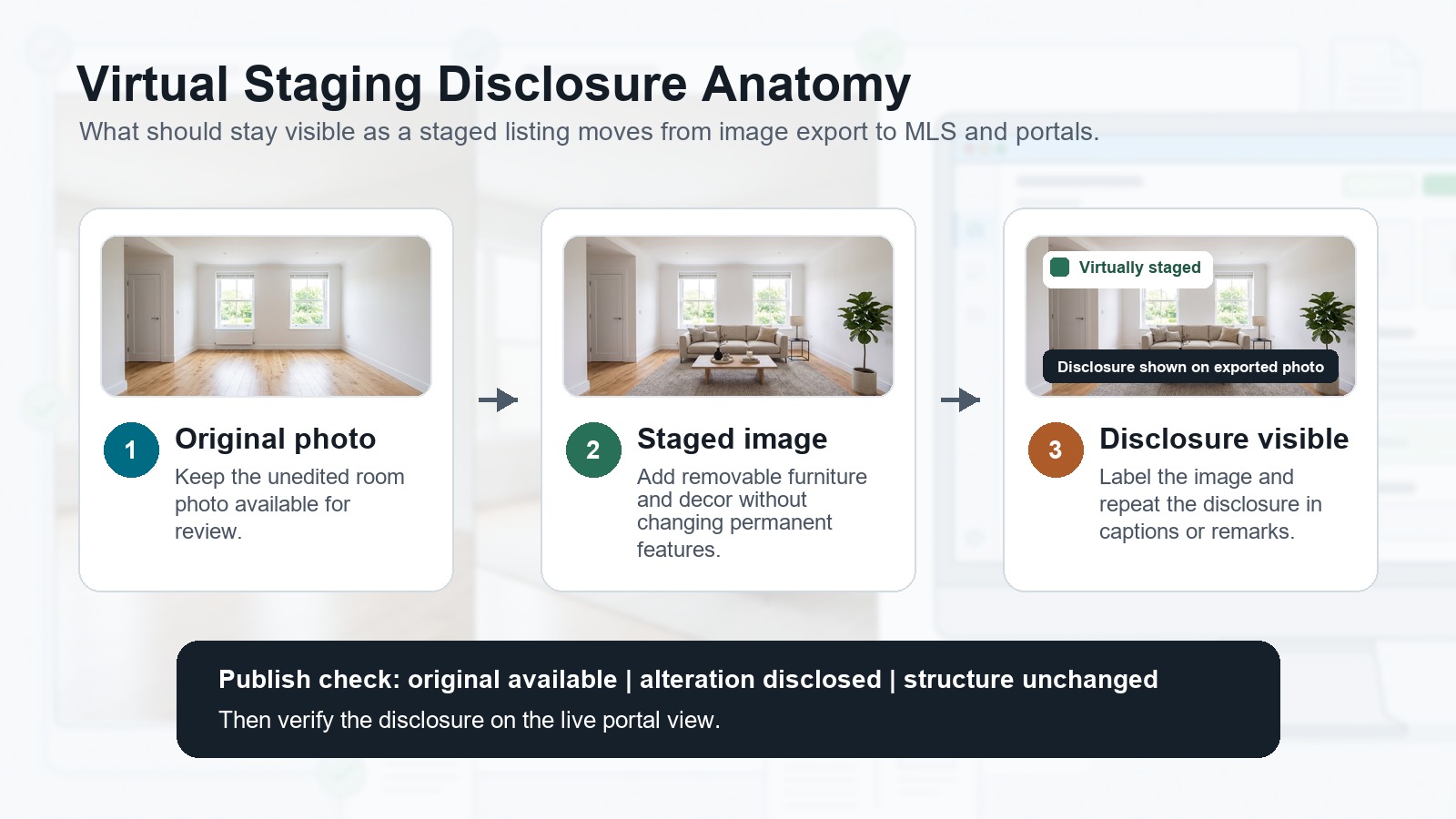
The last step is easy to miss. A team may disclose correctly in the MLS, then reuse the same image on Instagram, a landing page, or a flyer with the label cropped out or the caption missing.
If the image travels, the disclosure needs to travel with it.
What counts as a digitally altered image?
Virtual staging usually means adding furniture, rugs, artwork, plants, lighting, decor, or other styling to a real property photo. In practice, MLS and legal rules often treat that as a type of digitally altered image.
California AB 723 is useful here because it draws a clear line. The law covers images changed with photo editing software or AI to add, remove, or change elements such as furniture, appliances, flooring, walls, paint color, landscaping, facade, floor plans, utility poles, views through windows, and neighboring properties.
It also excludes routine photo adjustments that do not change the representation of the property, such as lighting, sharpening, white balance, color correction, straightening, cropping, and exposure.
That distinction is useful even outside California:
- Better photo quality is usually enhancement.
- Added furniture is staging.
- Changed property features are a higher-risk alteration.
Virtual staging should clarify the room. It should not rewrite the property.
California AB 723: what changed in 2026
California AB 723 took effect on January 1, 2026. The bill added Business and Professions Code Section 10140.8 and requires a disclosure when a real estate broker, salesperson, or someone acting on their behalf uses a digitally altered image in advertising or promotional material for the sale of real property.
The important detail is placement. The law says the disclosure must be reasonably conspicuous and located on or adjacent to the image. It also requires a link, URL, or QR code to a publicly accessible page that clearly identifies the original, unaltered image.
For websites controlled by the broker, salesperson, or their representative, the unaltered version must be included in the posting or made available through a clear link.
CRMLS has its own practical implementation. Its digitally altered image guidance says the original, unaltered image must appear immediately before or after the altered image, and the altered image should be labeled in the photo description field with wording such as Photo Modified, Virtually Staged, Digitally Altered, or AI Altered.
For California listings, do not treat disclosure as one sentence buried in the property description. Think in pairs: original photo plus altered photo, with a clear label attached to the altered one.
How MLS rules differ by market
There is no single national upload rule that covers every MLS.
Some MLSs want a watermark. Some want a caption. Some require the original next to the staged version. Some allow staged photos without an original. Some prohibit text overlays in ordinary listing photos but make exceptions or use internal labeling tools for virtually staged images.
Here are examples from current MLS guidance:
Source | What it shows |
|---|---|
Original and altered images should appear together, and the altered image should be labeled in the photo description field. CRMLS also warns against changing real property elements unless those changes will exist at closing as part of the listed price. | |
Virtually staged photos must have a stamp or watermark, but SmartMLS says they do not need to be accompanied by an original as-is photo. | |
Disclosure is required in the photo description field. Adding or replacing personal property is permitted, but exterior staging, changing permanent fixtures, adding impossible views, and removing negative elements are prohibited. | |
Virtually staged photos or renderings must be disclosed, and edits may not add or remove visual elements outside the property owner's control. | |
Disclosure must be clear and directly on the image or within the virtual tour; captions or remarks alone are not acceptable. It also requires a nonstaged original image immediately before or after the staged image, or easily accessible alongside the virtual tour. |
The takeaway: check the rule for the market you are uploading to. A workflow that passes in one MLS can be incomplete in another.
What you should not change in listing photos
The cleanest use case for AI virtual staging is furnishing an empty or lightly furnished room. A sofa, bed, rug, dining table, lamp, plant, and artwork can help the buyer understand scale and use without changing the property itself.
Be much more careful with edits that change the property or its surroundings:
- Do not add, remove, or move walls, windows, doors, stairs, fireplaces, or built-ins.
- Do not change flooring, cabinets, countertops, paint color, landscaping, or exterior facade unless the property will truly be delivered that way and your MLS allows it.
- Do not remove damage, stains, cracks, exposed wiring, utility poles, highways, neighboring buildings, or other negative visual elements.
- Do not create views, skyline scenes, pools, outdoor kitchens, fireplaces, or amenities that do not exist.
- Do not change proportions to make a room look larger.
This is also where product discipline matters. If you are staging for a listing agent, the best output is not the most dramatic image. It is the most useful image that still respects the actual property.
Disclosure wording examples
Use plain language. The buyer should understand the disclosure without knowing MLS terminology.
On-image label:
- Virtually Staged: Furniture and decor digitally added.
- Virtually Staged Image. Room is currently vacant.
- Digitally Altered Image: See original photo for current condition.
MLS photo caption:
- Virtually staged. Furniture and decor were digitally added; original unaltered photo is included next to this image.
- Digitally altered image. Original unaltered photo appears immediately before or after this image.
- AI altered image. Furniture and appliances shown are not included unless stated in the purchase agreement.
Listing description:
- Some photos have been virtually staged to help buyers visualize the space. Virtually staged images are labeled, and original unaltered photos are included where required by MLS rules.
- Photos marked Virtually Staged include digitally added furniture and decor. Please review the original photos and tour the property to confirm current condition.
California-style ad disclosure:
- Digitally altered image. Original unaltered photo available at [URL] or by scanning the QR code.
The best disclaimer is specific. If the room is vacant, say it is vacant. If furniture was removed before restaging, say that. If furniture or appliances are not included, say that.
Where disclosures get lost
Most disclosure mistakes happen after the MLS upload, when the same image is reused somewhere else.
A single staged image may appear in:
- MLS photos
- Zillow, Realtor.com, Redfin, and IDX feeds
- Brokerage listing pages
- Agent websites
- Email campaigns
- Instagram, Facebook, TikTok, and YouTube Shorts
- Paid ads
- Printed flyers and postcards
- Seller reports and listing presentations
The MLS caption may not follow the image everywhere. An on-image label may be cropped by a social platform. A flyer may use the photo without the original beside it.
That is why a two-part system works better: keep the image itself labeled when allowed, and keep a short disclosure sentence wherever the image is published.
Do MLS rules require original photos with virtual staging?
Sometimes. CRMLS and Canopy MLS require the original or nonstaged image to appear immediately before or after the staged image, or to be easily accessible alongside it. SmartMLS says virtually staged photos do not need to be accompanied by an original as-is photo.
That difference is exactly why local MLS rules matter. If you work across multiple markets, keep the original photo for every staged image and build your workflow so you can publish both when required.
Can you virtually stage occupied homes?
Yes, but occupied homes need extra care. If the edit removes existing furniture, personal items, clutter, or decor before adding new staging, disclose that the image was digitally altered. A buyer should not assume the current room looks like the staged version.
For occupied homes, the safest approach is to preserve fixed property features, avoid hiding damage or condition issues, and keep the original image available for comparison.
Can virtual staging change walls, floors, or landscaping?
Treat those edits as higher risk. Some MLS rules allow certain changes only if they will exist at closing as part of the listed price; others prohibit changes to permanent fixtures, exterior conditions, or elements outside the property owner's control.
If the edit changes the property itself rather than furnishing the room, do not treat it as ordinary virtual staging. Check the MLS rule, disclose the change clearly, and keep the original image available.
How we implemented compliance in Virtual Staging Art
Compliance is easiest when the tool keeps the original photo, the staged result, and the disclosure step close together. That is how we think about Virtual Staging Art: the product should help create a better listing image without making it harder to show what changed.
The first measure is the before-and-after viewer. Keeping the original and staged image side by side makes it easier to review the edit, catch anything that looks misleading, and provide the original when your MLS or state rule requires it.
The second measure is disclaimer text on downloaded photos. Since captions and listing remarks do not always travel with an image, adding a visible virtual staging disclaimer to the exported file helps preserve the disclosure when the photo is reused outside the MLS.
The third measure is structure preservation. Virtual staging should add furniture and decor around the existing room, not reinvent walls, windows, room proportions, flooring, views, or permanent fixtures. The closer the generated image stays to the source photo's structure, the easier it is to use responsibly in a real listing workflow.
These features support compliance workflows, but they do not replace MLS, broker, or legal review. They make the compliant path easier: keep the original, compare the staged result, export with disclosure, and publish only the version that accurately represents the property.
Final checklist
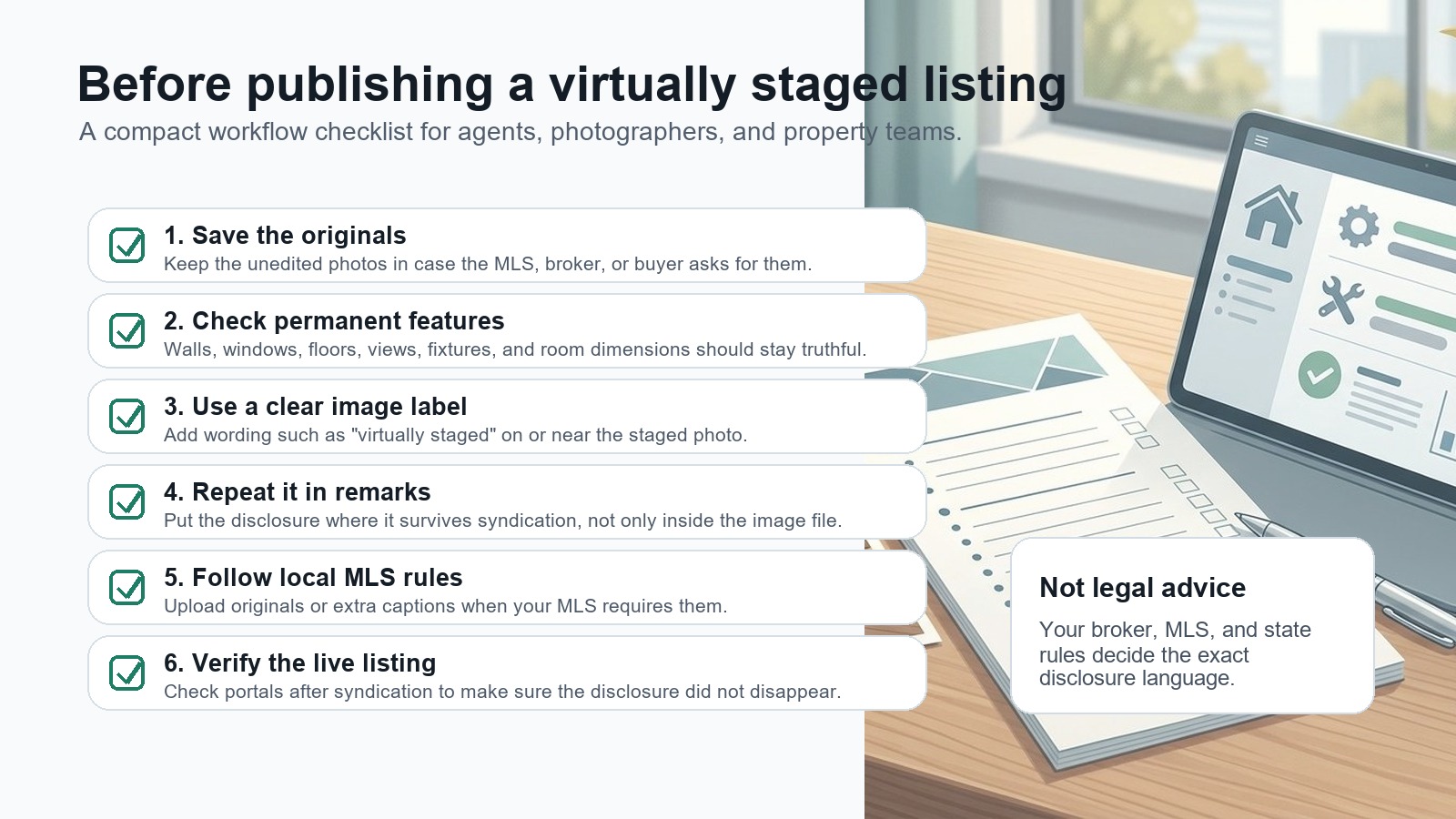
Before publishing a virtually staged listing, confirm:
- Every staged image is clearly labeled where buyers will see it.
- Original unaltered photos are saved and included when required.
- MLS photo captions or description fields are filled correctly.
- Listing remarks or ad copy disclose staging when allowed or required.
- No permanent property features, defects, views, dimensions, or surroundings were changed.
- The disclosure follows the image across social, email, ads, flyers, and your website.
- Your brokerage, MLS, and state requirements have been checked for the current year.
Virtual staging should help buyers understand a property faster. Clear disclosure keeps that benefit intact. It tells the buyer, honestly, what changed in the photo and what they should expect to see in person.