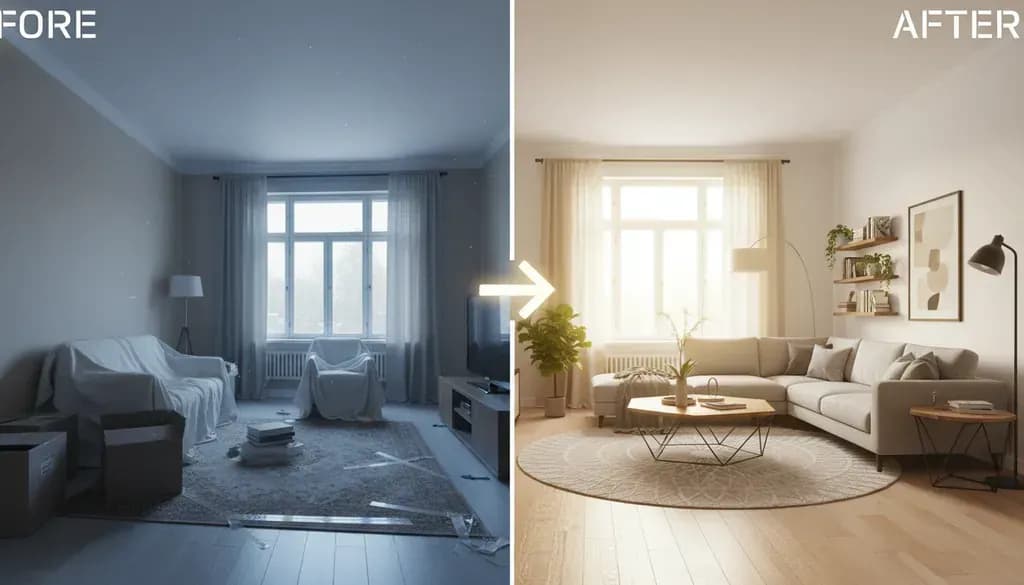
What Is Home Staging?
Home staging is the process of preparing a property for sale by arranging furniture, decluttering, and enhancing the space to appeal to the broadest range of buyers. The goal is to help potential buyers envision themselves living in the home, which typically leads to faster sales and higher offers.
According to the National Association of Realtors' 2023 Profile of Home Staging, 81% of buyers' agents said staging makes it easier for buyers to visualize the property as their future home. The same report found that 20% of sellers' agents reported an increase of 6-10% in dollar value offered when a home was staged compared to similar unstaged homes.
Why Before and After Photos Matter
Before and after photos serve two critical purposes. First, they document your baseline and help you identify which areas need the most attention. Second, they provide proof of transformation that you can use in listings or share with your real estate agent.
I've found that taking comprehensive before photos forces you to see your home through a buyer's eyes. You'll notice things you've been overlooking for years—the cluttered bookshelf, the oversized furniture blocking the window, or the dark corner that needs better lighting.
When you compare before and after shots, you can measure the impact of specific changes. Did painting the walls from beige to light gray make the room feel larger? Did removing two pieces of furniture improve the flow? These insights become valuable data points.
What to Document in Your Before Photos
Take photos from multiple angles in each room, focusing on these elements:
Layout and Flow
- Photograph from the doorway to show how someone first sees the room
- Capture any awkward furniture arrangements or blocked pathways
- Document traffic patterns through the space
Lighting Conditions
- Shoot at different times of day to see how natural light enters
- Note rooms that feel dark or have harsh overhead lighting
- Identify windows blocked by heavy curtains or furniture
Visual Clutter
- Personal photos, collections, and memorabilia
- Countertops covered with appliances or toiletries
- Overstuffed bookcases and crowded surfaces
Maintenance Issues
- Scuffed walls, chipped paint, or outdated wallpaper
- Worn carpets or damaged flooring
- Dated fixtures, hardware, or light switches
Use your phone's camera in natural light when possible. You don't need professional equipment—just clear documentation of the current state.
The Biggest Staging Transformations That Work
After reviewing hundreds of staging projects, certain changes consistently deliver the most dramatic results.
1. Removing Excess Furniture
The single most impactful change is typically removing 30-50% of the furniture. Rooms that felt cramped suddenly appear spacious. Buyers can see the actual square footage instead of feeling like they're navigating an obstacle course.
In one project I saw, a living room had a sofa, loveseat, two recliners, three side tables, and a bulky entertainment center. The after photo showed just the sofa, one accent chair, a coffee table, and a slim console. The room went from feeling like a crowded waiting room to an airy, inviting space.
2. Neutralizing Bold Colors
Bright red accent walls, dark purple bedrooms, or bold patterned wallpaper rarely appeal to buyers. Repainting in neutral tones—soft grays, warm whites, or greiges—creates a blank canvas.
This doesn't mean boring. You can add personality through artwork, throw pillows, or area rugs that are easy to change.
3. Improving Lighting
Dark rooms photograph poorly and feel uninviting during showings. The fix often involves:
- Replacing low-wattage bulbs with brighter LED options
- Adding floor or table lamps to dark corners
- Removing heavy drapes to let in natural light
- Installing dimmer switches for versatility
4. Decluttering Kitchen Counters
Kitchens sell homes, and buyers want to see counter space. Clear everything except perhaps a coffee maker or a simple bowl of fresh fruit. Buyers need to imagine preparing their own meals, not work around your appliance collection.
5. Depersonalizing Spaces
Family photos, kids' artwork on the fridge, personal collections, and religious items should be packed away. This can feel uncomfortable—you're erasing your presence from your own home—but it's essential for letting buyers imagine their own lives in the space.
Room-by-Room Staging Strategies
Living Room
Before Issues:
- Furniture pushed against all walls
- TV as the dominant focal point
- Mismatched furniture styles
- Lack of conversational groupings
After Solutions:
- Float furniture away from walls to create intimate seating areas
- Arrange seating to face each other, not just the TV
- Use a cohesive color palette across furniture and accents
- Add a large area rug to anchor the space
Kitchen
Before Issues:
- Cluttered countertops with appliances, mail, and miscellaneous items
- Magnets and papers covering the refrigerator
- Visible dish soap, sponges, and cleaning supplies
- Outdated or mismatched cabinet hardware
After Solutions:
- Clear counters completely except for one or two decorative items
- Remove everything from the refrigerator front
- Hide all cleaning supplies and daily-use items
- Update cabinet pulls and knobs if they're dated (this costs $50-150 but makes a significant visual impact)
Primary Bedroom
Before Issues:
- Unmade bed or busy patterned bedding
- Exercise equipment or laundry visible
- Oversized furniture making the room feel small
- Personal items on nightstands and dressers
After Solutions:
- Use hotel-style white or neutral bedding with layered pillows
- Remove all non-bedroom items (treadmills, laundry baskets, work desks)
- Keep only essential furniture—bed, two nightstands, one dresser
- Clear all surfaces except matching lamps and perhaps a small plant
Bathrooms
Before Issues:
- Toiletries covering counters
- Personal hygiene items visible
- Worn towels or bath mats
- Soap scum or water stains
After Solutions:
- Remove all personal care products from view
- Display fresh white towels in matching sets
- Deep clean grout, fixtures, and mirrors until they sparkle
- Add a small plant or candle for a spa-like touch
Dining Room
Many homes use the dining room for storage or as a makeshift office. The after photo should show it as an actual dining space. Set the table with simple place settings, add a centerpiece (fresh flowers or a bowl of lemons work well), and remove any non-dining furniture.
Virtual Staging: A Modern Alternative
If your home is already empty, or if you're working with a tight budget, virtual staging offers a cost-effective solution. AI virtual staging services can digitally furnish empty rooms for $1 per render, or 50c per render on subscriptions—dramatically less than the $2,000-5,000 that traditional physical staging typically costs for an entire home.
Virtual staging works particularly well for vacant properties that photograph as cold, empty boxes. According to the 2024 Redfin survey on homebuyer preferences, 82% of buyers found it easier to visualize a property as their future home when listings included staged photos rather than empty rooms.
To compare this approach with traditional home staging, browse virtual staging before-and-after examples across living rooms, bedrooms, kitchens, dining rooms, offices, studios, and occupied homes.
The process is straightforward: photograph your empty rooms, upload the images to an AI-powered virtual staging tool, and receive professionally staged images within hours. You can experiment with different furniture styles to see what appeals to your target buyer demographic.
One important note: if you use virtually staged photos in your listing, most MLSs require disclosure. Include language like "Photos have been virtually staged" in the listing description to maintain transparency.
Analyzing Your Results
Once you've completed your staging and taken after photos, compare them side-by-side with your before shots. Here's what to evaluate:
Visual Impact
- Does the room feel larger and more open?
- Is the eye naturally drawn to the room's best features (fireplace, windows, architectural details)?
- Does the space feel cohesive and intentional?
Functionality
- Can you easily imagine how the space would be used?
- Is the furniture arrangement practical for daily living?
- Does the room serve a clear purpose?
Emotional Response
- Does the after photo make you want to spend time in the space?
- Would you describe it as inviting, peaceful, or aspirational?
- Can you envision yourself living there?
If you're still seeing issues in your after photos, that's valuable information. Maybe the room needs one more furniture piece removed, or the lighting still isn't quite right. Use these photos as a diagnostic tool to fine-tune your staging.
The difference between a home that sits on the market and one that sells quickly often comes down to presentation. Before and after photos give you concrete evidence of your staging efforts and help you make objective decisions about what's working. Whether you're doing physical staging yourself, hiring a professional, or using virtual staging for vacant rooms, documenting the transformation keeps you focused on changes that actually matter to buyers.